


KptnCook: Recipes & Cooking
3.875.00 Reviews
App Specs
- Version
- Varies with Device
- Updated On
- License
- Free
- Downloads
- 1,000,000+
- Developer
- KptnCook GmbH
- Categories
- Food & Drink
- Platform
- Android, iOS
Screenshots

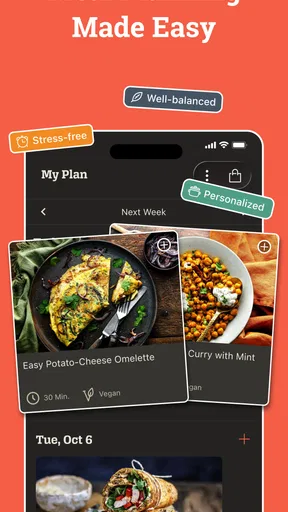
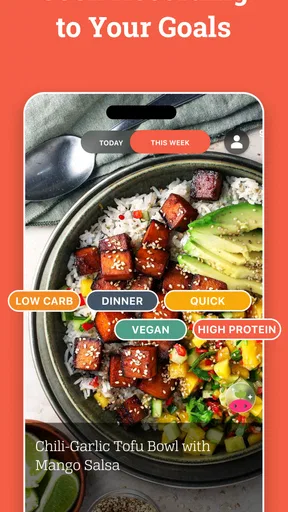
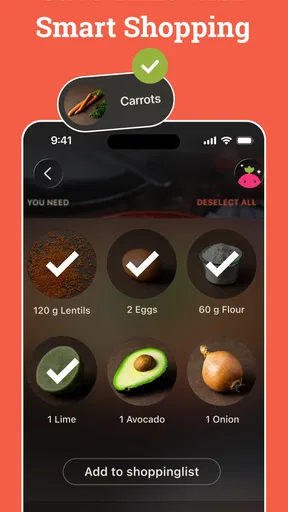
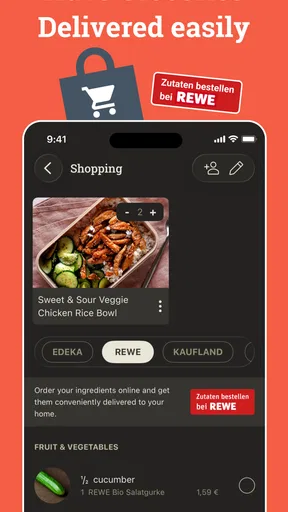

 Analysis by AppCompare
When I have a busy evening ahead, the hardest part of dinner can be deciding what to make before I even start cooking. KptnCook Recipes & Cooking aims to make that choice easier by bringing recipes, planning tools, a calorie counter and a grocery list together. After spending time with it, I can see why a daily set of ideas might help someone who wants to cook more often. The bigger test, though, is whether the app remains useful after the first burst of inspiration wears off.
Why the first week feels inviting
The app’s strongest early appeal is that it gives you a manageable starting point instead of asking you to search endlessly. Its daily recipe selection can help when you want an idea but do not have a dish in mind. I like this approach for weekday cooking: browse a few options, settle on one, and get on with the practical questions of ingredients and timing.
It is also a useful way to break out of a narrow rotation of familiar meals. Trying one new recipe at a time feels less demanding than committing to a full meal plan immediately. I would treat the suggestions as prompts rather than instructions to follow every day; that keeps the app helpful without turning cooking into another obligation.
A routine matters more than novelty
Recipe apps often win attention with attractive dishes, then lose it when choosing and organizing dinner still feels like work. Here, the combination of recipes and planning tools has the potential to be more durable than browsing alone. The meal planner can give a week some shape, while the grocery list helps translate a choice on screen into a trip to the shop. For me, those practical steps are what make an app worth reopening.
A realistic routine might be to browse when planning a few dinners, save the recipes that fit your week, and use the list to check what you need before shopping. That is more sustainable than opening the app every evening and expecting it to solve the whole dinner problem from scratch. If you cook irregularly, even using it for one planned meal can be worthwhile; it does not have to become the center of your kitchen routine.
What it asks of you over time
The tools work best when you give them a little input. Ingredient suggestions are only as useful as the ingredients you enter, and a shopping list is only dependable if you review it against what is already in your kitchen. I recommend checking quantities and pantry staples before leaving home rather than treating any automatically assembled list as a perfect inventory. That small habit can prevent duplicate purchases and last-minute surprises.
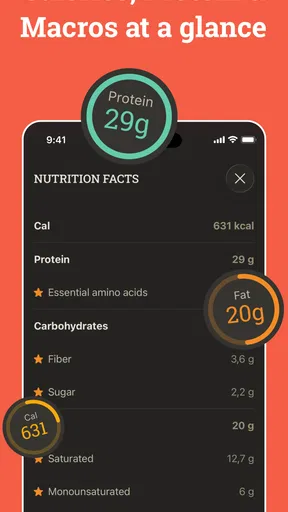
The calorie counter may appeal if nutrition tracking is part of your routine, but it is not a substitute for a personalized dietary plan. People who need precise medical or allergy-related guidance should check recipes and ingredients carefully and rely on advice suited to their needs. Likewise, filters can narrow choices, but I would still read each recipe before cooking if a particular ingredient matters to you.
Worth Reading Before You Choose

Flipboard Shows What News Apps Must Do Beyond the Feed

Switching to Android Auto Means Rethinking Your Driving Routine

Google Calendar Makes a Crowded Week Easier to Manage

Ludo King Makes the Most of the Minutes Between Plans

Baby Panda World Brings Quick Play to Modern Phones, but Its Game Library Feels Busy

ESPN’s Live Game View Makes Following Close Games Easier
Where the experience can wear thin
Daily inspiration is convenient, but it can also become background noise if the suggestions do not match your tastes, schedule or available ingredients. A recipe that looks appealing is not automatically a practical weeknight option, so check the steps and estimated time before committing. If you prefer to decide entirely for yourself, a broad recipe search or your own saved collection may feel less prescriptive.
There is also a difference between discovering a recipe and building a lasting cooking habit. The app can reduce some planning friction, but it cannot shop, chop or adapt a dish to your household. I would skip it if you rarely cook at home, already have a meal system that works, or want a bare-bones recipe notebook with no extra planning or tracking. Someone who enjoys improvising from memory may find the structured approach unnecessary.
How it fits alongside other cooking options
Compared with searching the web for each meal, having recipes and planning tools gathered in one place can make the path from idea to shopping more coherent. A general recipe site may offer a wider browsing experience, while a simple notes app gives you more control over your own collection and less structure. KptnCook’s appeal is the middle ground: inspiration connected to practical planning. That convenience matters most when you want a nudge and a way to organize the next few meals, not when you need exhaustive culinary research.
First impressions and the daily choice
Opening KptnCook for the first time, I was greeted by a sleek and vibrant interface. The design is intuitive, making it super easy to navigate through a plethora of recipes. One thing that stood out immediately was the daily recipe feature. Each day, the app presents you with three fresh recipes, which is perfect for those of us who love variety but hate decision fatigue.
Diving Into the Features
Let’s talk features, because this app is packed with them. First off, the recipe selection is diverse. We're talking everything from comforting classics to exotic dishes. Whether you’re in the mood for a quick 20-minute meal or a gourmet experience, KptnCook has got you covered.
One of my favorite features is the "What’s in your fridge?" option. You simply input the ingredients you have on hand, and the app suggests recipes based on those items. It’s a game-changer for reducing food waste and getting creative in the kitchen.
Another highlight is the dietary filter. Whether you’re vegan, gluten-free, or just trying to eat healthier, you can filter recipes to suit your dietary preferences. It makes meal planning a breeze, and I found myself trying out new ingredients I wouldn’t normally pick up.
Making a recipe work in a real kitchen
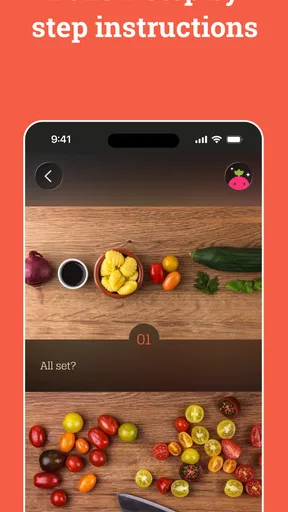
So, how does the cooking process hold up? Pretty impressively. Each recipe comes with step-by-step instructions, complete with pictures. It’s almost like having a mini cooking class right in your kitchen. Plus, the app gives you an estimated cooking time, so you can plan your schedule accordingly.
Those pictures are especially useful when a technique is unfamiliar, but I still suggest reading the full method before heating a pan. That quick scan helps you spot whether ingredients need separate preparation or whether the recipe calls for several actions in sequence. The listed time is best treated as a guide, not a promise: a new cook may need longer, while someone familiar with the dish may move faster. If you are cooking with a tight evening schedule, check the steps first and choose a simpler option when the timing looks close.
Another practical use is cooking from what is already on hand without assuming the app can account for every detail in your cupboards. Entering a few ingredients can provide a starting point, but I would include the main items you want to use and then inspect the suggested recipe for anything essential you lack. This works particularly well for using up a vegetable or other ingredient before it is forgotten, while still leaving room to substitute only when the recipe can reasonably tolerate it.
One thing I really appreciated was the shopping list feature. Once you select a recipe, the app generates a shopping list for you. It’s organized by aisle, making grocery shopping straightforward and efficient. No more wandering around the store aimlessly!
Planning for different appetites and needs
For someone learning to cook, the photos and ordered instructions offer more reassurance than a short recipe note, and the daily ideas can gently broaden what feels familiar. More experienced cooks may get greater value from the planning and list-making than from the instruction itself. I would not expect a guided recipe to replace judgment: taste as you go, use your knowledge of your stove, and adjust seasoning to suit the people eating.
Dietary filters are useful for narrowing the field, but they are not a guarantee that every recipe will suit every restriction. If you are avoiding an ingredient for health reasons, inspect the ingredient list and preparation details rather than relying on a category label alone. For a household with different preferences, the practical compromise is to choose a flexible base meal and make optional additions separately. That kind of adaptation is still your job, but the app can help you find the starting recipe.
The calorie counter is another reason some people may return regularly, especially if they already track meals. It is not essential to using the recipe and planning side, so I would not let it put off anyone who simply wants cooking ideas. Equally, people who want detailed nutrition analysis as their main purpose should compare it with a dedicated tracking tool; a cooking app’s broader convenience may not be the same as specialist depth.
Small habits that make the tools more useful
I found it helps to separate planning from cooking. Browse when you have a calm moment, select meals that fit the coming days, and make a quick pass through the grocery list before shopping. That reduces the chance of choosing a tempting recipe at the exact moment you are already hungry and short on time. It also makes the list a working reminder rather than a substitute for checking your fridge and cupboards.
There is a useful trade-off in the ingredient-matching idea: it encourages resourcefulness, but it can also make a recipe seem more exact than real cooking needs to be. If you have most of the ingredients, check which missing items are central to the dish and which are easy to leave out or replace. I would be cautious about improvising around baking or other recipes where proportions matter; for a flexible stew or bowl, personal adjustments are often less intimidating.
For a shared household, one person can use the app to pick a meal and prepare the shopping list, while another checks what is already available. That simple division can make the plan more reliable without turning dinner into a complicated project. If you live alone, the same process helps you think about whether a recipe’s ingredients can be used again in another meal, rather than buying something for one dish and letting the rest sit unused.
What keeps it relevant—and what may not
KptnCook is made by KptnCook GmbH and sits in the food and drink category. It is free to download, with optional in-app purchases listed from $5.49 to $89.99 per item, so I would look at the available terms in the app before paying for anything. Its average rating is 3.8 from around 28,000 ratings, and it has over one million installs. Those figures suggest an established audience, but they do not tell me whether its particular approach will fit your cooking habits.
The app is rated for Everyone and has been available since March 31, 2016. That history makes it feel like a familiar, established recipe product rather than a brand-new experiment, though what matters more is whether its current tools fit your needs. I would start with the free experience and judge it by whether you actually use the recipes, planner and list more than once. Optional spending is easiest to evaluate after you know which parts have become part of your routine.
For lasting value, I would focus on a repeatable weekly pattern rather than trying to use every tool. Pick a couple of meals, check their steps and ingredients, and use the list as a prompt to shop thoughtfully. If the daily suggestions stop feeling relevant, lean on the fridge-ingredient search or take a break; there is no benefit in forcing a daily habit. The app is most useful when it quietly removes a small obstacle, not when it becomes another feed demanding attention.
Community and extra perks
What makes this app stand out even more is the sense of community it fosters. You can follow other users, share your own creations, and even get inspired by the cooking adventures of fellow home chefs. It’s like social media, but for foodies.
That social side will matter more to people who enjoy seeing how others approach food than to cooks who want a private, practical tool. I would treat community posts as inspiration, not as tested directions: a shared creation may reflect someone’s own substitutions, equipment and preferences. If you find yourself spending more time browsing than choosing something to cook, it may be worth going straight to the recipe and planning tools instead.
Also, I discovered the app offers tips and tricks to enhance your cooking skills. Little things like knife techniques or how to properly season a dish can make a big difference, and KptnCook delivers these nuggets of wisdom seamlessly.
My long-term take
Overall, KptnCook Recipes & Cooking has become one of my go-to apps for meal inspiration. It’s user-friendly, packed with features, and genuinely makes the cooking process more enjoyable. Whether you’re a seasoned chef or a kitchen newbie, this app is definitely worth checking out.
So, if you’re ready to spice up your culinary routine and explore new flavors, give KptnCook a try. Your taste buds will thank you!
Pros
- User-friendly interface makes navigation easy.
- Wide variety of recipes for all dietary needs.
- Step-by-step guides simplify the cooking process.
- Shopping list feature enhances convenience.
- Regular updates with new recipes and tips.
Cons
- Some features require a paid subscription.
- Limited offline functionality can be inconvenient.
- Occasional ads may disrupt user experience.
- Requires stable internet for full functionality.
- Limited customization for dietary preferences.
FAQs for KptnCook: Recipes & Cooking
What is KptnCook and how does it work?
KptnCook is a meal planning app designed to simplify your cooking experience. Each day, it offers three new, healthy recipes that can be prepared in under 30 minutes. The app provides step-by-step instructions, grocery lists, and nutritional information, making it easy for users to plan and prepare meals efficiently.
Is KptnCook suitable for specific dietary preferences?
Yes, KptnCook caters to a variety of dietary preferences, including vegetarian, vegan, gluten-free, and more. Users can customize their preferences in the app settings, ensuring that the daily recipe suggestions align with their dietary needs and lifestyle choices.
Does KptnCook offer a free version, and what features are included?
KptnCook offers a free version that includes access to daily recipes, grocery lists, and basic meal planning features. However, for advanced features like personalized meal plans, extended recipe access, and additional customization options, users may need to subscribe to the premium version.
How does KptnCook ensure the quality and variety of its recipes?
KptnCook collaborates with professional chefs and nutritionists to curate a diverse array of recipes. The app emphasizes seasonal ingredients and healthy cooking methods, ensuring that users enjoy both quality and variety. Feedback from users also helps refine and expand the recipe collection over time.
Can KptnCook integrate with other apps or devices?
Yes, KptnCook can integrate with various grocery delivery services, making it easier to order ingredients directly through the app. Additionally, it syncs with calendar apps to help users organize their meal plans. This seamless integration enhances the overall user experience by streamlining meal preparation and planning.


